


Staff Airlines: Non-Rev Travel
3.020.00 Reviews
App Specs
- Version
- 2.2.10
- Updated On
- License
- Free
- Downloads
- 50,000+
- Developer
- Agat Systems SL
- Categories
- Travel & Local
- Platform
- Android
Screenshots
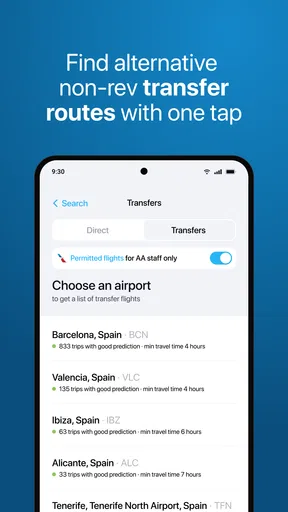
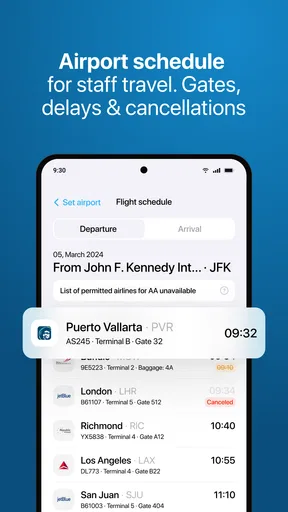
 Analysis by AppCompare
I approach Staff Airlines as a practical travel tool, not an airline-management game. Its focus is staff travel: the app is intended to help airline employees check flight loads and think through a backup plan. That distinction matters before you install it, because someone looking for route-building, aircraft customization, or a simulation will be disappointed. For a staff traveler who needs a quick view of flight availability, though, the idea is genuinely useful.
Trust starts with knowing what the app is for
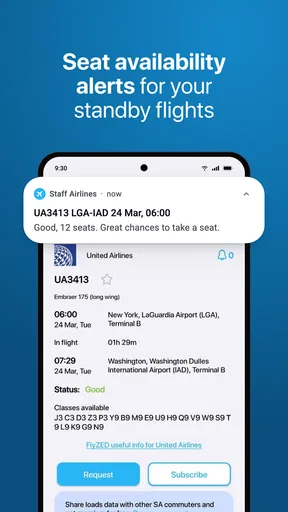
Staff travel can be a data-sensitive moment. You may be deciding whether to head to an airport, change plans, or ask someone else to travel with you, and a load estimate can shape that choice. I would treat this app as one input into a travel decision rather than a guarantee of a seat. A flight that looks promising can still change, and the sensible plan is to keep a workable alternative in mind.
The developer is Agat Systems SL, and the app sits in the travel-and-local category. It is free to install, with in-app purchases listed from $1.99 to $39.99 per item. That makes it worth checking what any purchase offers and whether it fits your own use before paying. The age rating is Everyone, but that should not be confused with a statement about privacy or account security; those are separate questions I would consider whenever an app handles travel-related activity.
What I would check before relying on it
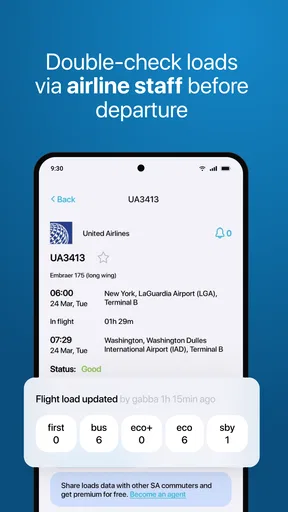
I would begin by confirming that the app is intended for my airline and staff-travel arrangements, then compare a result with the airline’s own staff-travel channel before making a costly or time-sensitive trip. The app’s purpose is narrow enough that a mismatch in eligibility or airline coverage would make it much less useful, so this basic check is more valuable than spending time exploring screens that may not apply to me.
I also look at the permissions an app requests when installing or first using it, and whether the operating system lets me deny anything that does not seem necessary for the task. I do not assume that a travel app needs access to every part of a phone. If I encounter an account step, I would use a password I do not reuse elsewhere and review any available account controls before storing personal details. These are sensible checks, not claims about specific controls inside this app.
When flight-load information needs context
A load view is most valuable when it helps me compare options, not when I treat it as a promise. For a flexible traveler, checking more than one departure time and keeping a later flight in reserve can turn a useful snapshot into a better decision. If I have a fixed appointment, a connection I cannot miss, or a family member who needs a firm arrival time, I would be much more cautious and look for a confirmed booking or another dependable arrangement.
I would also avoid making a decision from a single check far ahead of departure. Rechecking closer to travel can help me notice a change, while leaving enough time to act on it. That does not remove uncertainty, but it is a practical way to use load information without letting a convenient screen substitute for the airline’s current rules or a confirmed seat.
Worth Reading Before You Choose

Flipboard Shows What News Apps Must Do Beyond the Feed

Switching to Android Auto Means Rethinking Your Driving Routine

Google Calendar Makes a Crowded Week Easier to Manage

Ludo King Makes the Most of the Minutes Between Plans

Baby Panda World Brings Quick Play to Modern Phones, but Its Game Library Feels Busy

ESPN’s Live Game View Makes Following Close Games Easier
How it fits among travel alternatives
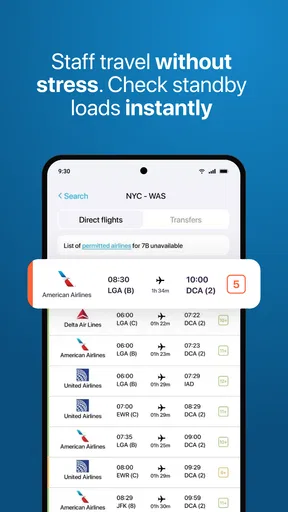
General flight-search apps are usually better for comparing public fares, schedules, and destinations. An airline’s own app or staff-travel portal is the place I would turn for official booking steps, travel rules, and confirmation. Staff Airlines has a more specific role: it is aimed at checking flight loads for staff travel and planning a fallback. It is not a replacement for a standard trip planner, and I would not use it as proof that I am ticketed.
The rating gives me reason to approach it with measured expectations: it averages 2.7 from around 200 ratings, with 15 written reviews. More than 50,000 installs show that people have tried it, but popularity alone does not tell me whether it will fit my airline or work reliably for my particular trip. I would install it for a relevant staff-travel need, test it against an official source, and judge it by whether its information helps me make a better choice.
Taking Off: First Impressions
Upon launching Staff Airlines, you're immediately greeted with a sleek and intuitive interface. The app doesn’t waste time with unnecessary fluff, which is something I always appreciate. Instead, it gets straight to the point, inviting you to start your airline journey. The onboarding process is smooth and informative, giving you a quick tour of what to expect as a budding airline manager.
The graphics are vibrant and engaging, which makes the experience not only fun but also visually pleasing. The app's design is user-friendly, ensuring that even those who aren’t tech-savvy can navigate it with ease. I found myself quickly immersed in the world of aviation, eager to see what challenges and opportunities lay ahead.
Your Airline, Your Rules
What sets Staff Airlines apart is the level of control it gives you over your airline. You start with a modest fleet of planes and a small airport, but as you progress, the sky’s the limit. You get to make decisions on everything from flight routes and ticket prices to plane upgrades and airport amenities.
One of my favorite features is the ability to customize your aircraft. You can choose different liveries and interiors, making each plane unique to your airline’s brand. This personalization adds a nice touch and makes you feel more invested in your airline’s success.
Challenges in the Skies
Running an airline isn’t all smooth sailing, or should I say flying? Staff Airlines throws realistic challenges your way, such as weather disruptions, maintenance issues, and fluctuating passenger demands. These elements keep you on your toes and make the game more engaging.
I appreciated how these challenges encouraged strategic thinking. For instance, deciding whether to focus on short-haul or long-haul flights can significantly impact your airline’s profitability and reputation. It’s a balancing act that keeps you coming back for more, trying different strategies to see what works best.
Engaging Community and Updates
Another aspect worth mentioning is the community surrounding Staff Airlines. There are forums and social media groups where players share tips, tricks, and even their airline success stories. It’s a vibrant community that adds an extra layer of depth to the app.
The developers also seem committed to keeping the app fresh and exciting. Regular updates introduce new features and improvements, ensuring that the game remains relevant and engaging for long-term players. It’s always exciting to see what new content is on the horizon.
Final Approach
In conclusion, Staff Airlines offers a well-rounded and immersive experience for anyone fascinated by the aviation industry. From its intuitive design and engaging graphics to the strategic gameplay and active community, it ticks all the boxes for a successful app.
Whether you're a seasoned gamer or new to the world of mobile apps, Staff Airlines has something for everyone. It’s a fantastic way to pass the time, challenge your strategic skills, and live out your airline management dreams. So, if you’re ready to take to the skies, download the app and start your journey today!
A realistic way to build a backup plan
Imagine I finish work and need to travel the next morning, but my staff-travel option depends on space being available. I could use a load-checking tool to compare the flight I prefer with another departure, then decide whether the earlier option is worth attempting or whether I should preserve time for the fallback. The useful outcome is not certainty; it is a clearer choice before I leave home. I would still check the airline’s official channel for the rules and the latest operational information.
For this kind of trip, I would make a small plan before opening the app: note the latest time I can arrive, identify one alternate flight, and decide what would make me stop trying and switch plans. That prevents repeatedly refreshing a load figure without knowing what action I would take. It is a modest workflow, but it makes a staff-travel check more useful and helps keep an uncertain standby journey from turning into an open-ended airport wait.
Who gets the most value from it
I can see the strongest fit for airline staff who already understand their travel privileges and want a focused way to assess flight loads while considering alternatives. It may also help a staff traveler who is comfortable making flexible plans and can absorb a delay or a change of departure. The app’s narrow purpose is a strength for that audience: it is more directly relevant to staff loads than a general flight-search service built around public fares.
I would skip it if I were a regular leisure traveler searching for the cheapest ticket, comparing destinations, or needing a confirmed itinerary. I would also avoid depending on it as my only planning tool for a time-critical event. In those situations, an official booking channel or a conventional travel app is a better match, because the key need is a confirmed trip or fare comparison rather than a staff-load check.
Practical checks that preserve your choices
When comparing flights, I would consider the whole journey rather than just the apparent load: airport transfer time, the consequences of missing that departure, and whether a later option is still realistic. A flight that looks better on paper may not be the safer choice if it leaves no room to recover from a change. Keeping a separate note of the airline’s relevant staff-travel instructions can also prevent a load estimate from being mistaken for permission to board.
For privacy and account confidence, I would make decisions only from what I can actually see on my device: the permissions prompt, the account options presented, and the choices available in the app. I would not assume that a particular data policy, deletion option, or sign-in method exists without seeing it. If I am uncomfortable with a permission or an account request, I can pause and use the airline’s established staff channel instead. That gives me a practical alternative without pretending that an app’s travel purpose alone explains how it handles information.
Version, compatibility, and measured expectations
The current release is version 2.1.16, and the app requires Android 8.0 or later. I would check compatibility before relying on it for an upcoming trip, especially if I use an older device; installing it shortly before departure is a poor time to discover that the phone cannot run it. The release date was September 26, 2023, so I would also pay attention to the version shown on my device and keep the app current when updates are available.
My overall view is cautious rather than dismissive. A dedicated staff-load tool can make planning more informed, but it cannot turn an uncertain travel arrangement into a guaranteed seat. I would use it as a supporting check, keep an alternate flight or a different transport plan in mind, and rely on official airline guidance for the decisions that matter most. If that is the kind of help you need, it is worth considering; if you need certainty, broad trip discovery, or public fare booking, another travel option is likely to serve you better.
Pros
- User-friendly interface
- easy to navigate.
- Real-time flight status updates.
- Comprehensive airport information.
- Customizable notifications for flights.
- Offline mode for flight itineraries.
Cons
- Limited customer support options.
- Occasional app crashes reported.
- Some features require in-app purchases.
- Limited language options available.
- Battery drain issues on prolonged use.
FAQs for Staff Airlines: Non-Rev Travel
What is Staff Airlines and what does it offer?
Staff Airlines is an engaging simulation game available for both Android and iOS that allows players to experience the life of an airline staff member. Players can manage various aspects of an airline, from scheduling flights to ensuring passenger satisfaction. The game offers realistic challenges and rewards, making it ideal for aviation enthusiasts.
Is Staff Airlines free to play, or does it have in-app purchases?
Staff Airlines is free to download and play, but it does offer optional in-app purchases. These purchases can enhance the gaming experience by providing additional features, such as exclusive aircraft, faster progress, or unique customization options. However, all core gameplay features are accessible without spending money.
What are the system requirements for Staff Airlines?
For Android devices, Staff Airlines requires a minimum of Android 5.0 and 2GB of RAM. For iOS devices, it is compatible with iOS 11.0 or later. The game is optimized for both smartphones and tablets, ensuring smooth performance across various devices, provided they meet these minimum requirements.
Can I play Staff Airlines offline?
Staff Airlines requires an internet connection to access most features, such as leaderboards and updates. However, some basic gameplay can be enjoyed offline. To fully experience the game, including social features and the latest content, a stable internet connection is recommended.
Does Staff Airlines have a multiplayer mode?
Yes, Staff Airlines includes a multiplayer mode where you can collaborate and compete with friends or other players worldwide. You can join alliances, participate in global events, and compare your airline management skills on leaderboards. This feature adds a social dimension, making the game more interactive and competitive.


